Tag Archives: Markup languages

Returning JSON in a Zend Controller’s Action – Part 2

In a reply from my latest post after following the comments, there is a much elegant solution to this use case. Simply by changing the output with a JSON helper. This also changes the content-type of the returned response.

$data = array(...);
$this->_helper->json($data);

Returning JSON in a Zend Controller’s Action

There are three basic ways that you can achieve that. First of all what’s the task? You’ve an array, either from a database result or whatever, and you encode it JSON with Zend_Json::encode($array)

// IndexController.php
class IndexController extends Zend_Controller_Action
{
	public function indexAction()
	{
		$data = array(...);
 
		$this->view->data = Zend_Json::encode($data);	
	}	
}

The result in general is a specially formatted string. So you can simply set it up to a view member variable and pass it to the view.

// index/index.phtml
echo $this->data

In that case you’ve a .phtml file to maintain, so lets just return the string and “setNoRender” the view in our second try.

// IndexController.php
class IndexController extends Zend_Controller_Action
{
	public function indexAction()
	{
		$data = array(...);
 
		echo Zend_Json::encode($data);	
 
		$this->_helper->viewRenderer->setNoRender(true);
	}	
}

Actually this is pretty much the most clear solution, but actually you can output the JSON string and simply exit() as it’s shown in our third example.

// IndexController.php
class IndexController extends Zend_Controller_Action
{
	public function indexAction()
	{
		$data = array(...);
 
		echo Zend_Json::encode($data);	
 
		exit();
	}	
}

Which one is to be used is up to the developer’s choice, mine is the third one as it’s the minimal one.

jQuery: Get the Selected Option Text

What’s the Task?

First of all let me explain what is the task. If there’s a select menu with several options, each of which are with a given value attribute, the task is to get the text into the option tag, and not that of the value attribute.

In that scenario let’s assume that we have the following HTML:

<select id="my-select">
    <option value="1">value 1</option>
    <option value="2">value 2</option>
</select>
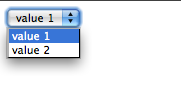
select menu
Note that in the official jQuery doc page, the selector is described in the same context, but with a different markup:

<select id="my-select">
    <option>value 1</option>
    <option>value 2</option>
</select>

than the jQuery snippet looks like that:

$(document).ready(function() {
    $("#my-select").change(function() {
        alert($(this).val());
    });
});

Here’s interesting to note that there’s no value attribute set to the options, thus the selection of an element is correct and the returned value is correct. The problem is that this code doesn’t work correctly once you’ve a different value attribute, from the value enclosed into the option tag. In our case we’ve the markup shown on the first code snippet and we’d like to get the “value 2” string instead of “2”.
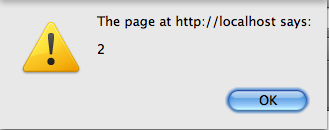
Source Code

<select id="my-select">
    <option value="1">value 1</option>
    <option value="2">value 2</option>
</select>
$(document).ready(function() {
    $("#my-select").change(function() {
        alert($(this).val());
    });
});

Solution

Finally the solution, is pretty simple and clear, but this time is not to so “native” and it’s definitely something you couldn’t expect! The only thing you’ve to do is to change the selector!

$(document).ready(function() {
    $("#my-select).change(function() {
        alert($('#my-select option:selected').html());
    });
});

How to Sanitize User Input in PHP?

It’s a question almost every PHP developer asks yourself. By me the most simple way to sanitize the user input is to save everything in the database with no loosing of tags or whatever HTML markup and than on displaying this on the client side to strip_tags if needed.

In example when saving a HTML formatted text you can use simply the htmlspecialchars method

$description = htmlspecialchars($_POST['description']);

Than you can be sure everything’s in the database, but it’s not actually HTML. Thus you don’t have any tags at all in the database field.

When you show this in the client side and you’d like to strip some tags, i.e. to keep only the <a> tag you can do this:

echo strip_tags(htmlspecialchars_decode($description), '<a>');

That’s the most simple way to keep everything as the original source. By me it’s better to keep whatever HTML markup there is on the input.

jQuery: what about this.title?

In my last post I was talking about the short way to access the id attribute:

this.id;
this.attr('id'); // this is the same but slower

Beside the most important thing that this is the slower notation, you get also larger notation, which in JavaScript is really pain.

What’s interesting is that you can access almost every attribute of an element with that notation. Take a look at the following example:

<img src="image.jpg" title="test" />

and than

$('element').title

This is much faster and quite nice in place of

$('element').attr('title');