Tag Archives: Web application frameworks

Bind Zend Action with Non-Default View – Part 2

Typical Setup

Typically Zend Framework is setup to bind every controller’s action to a specific view. The names of the action and the view script must be the same, or at least must be similar – following the ZF’s convention.

Thus if you name an action, let’s say, indexAction(), you’ve to create an index.phtml file into the views/scripts/index/ folder. Let me remind you that this is what is called a typical setup, but this may vary from one installation to another.

Thus everything’s fine and the MVC does its best. After the user requests a specific uri, the framework parses it and finds the controller, than the action and than the view script – and there is a view script for every single action.
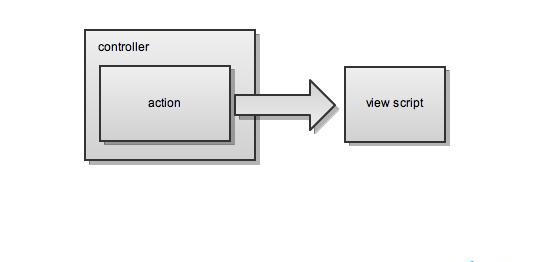
typical zend framework setup

When there are two or more actions – there are two or more .phtml (view scripts) files.
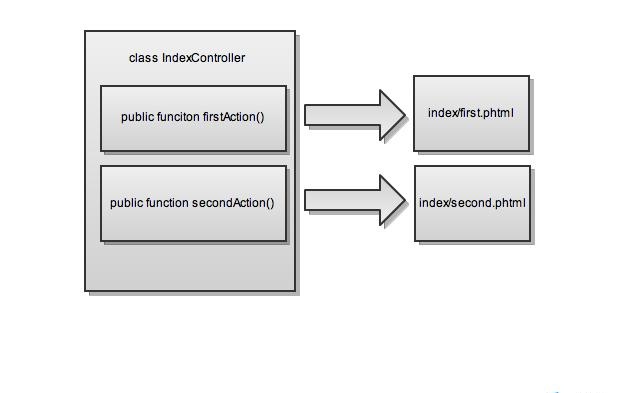
typical zend framework setup for two or more actions

Some Exceptions

Sometimes you have very similar logic, but very different markup between two actions. As the logic goes to the controller/action and the markup into the view, the question is can you simply have one action in the controller, but with two different .phtml file as a view scripts? Of course switching between those two (or more) with some conditionals.

Solution No. 1

However once I posted a simple, and working, solution. There you have again two actions and two scripts:

<?php
 
class IndexController extends Zend_Controller_Action
{	
	public function firstAction()
	{
		// place all the logic you need here
		// and every view placeholder assignment
		$this->view->title = "My Title";
 
		// if the logic requires a different markup
		// simply redirect to another view
		if (some_expression) {
			$this->_forward('second');	
		}	
	}
 
	public function secondAction()
	{}
}
 
// in the application/views/scripts/index
// 1. first.phtml
<h1><?php echo $this->title ?></h1>
 
// 2. second.phtml
<h2><?php echo $this->title ?></h2>

As you can see in the second action there’s no logic – it’s only serving the role of a bridge between the views. Everything is setup into the first action, but the second action is doing the relation with the second.phtml view script.

Solution No. 2

However there’s another solution with only one action and two scripts which makes something like that shown on the diagram bellow:
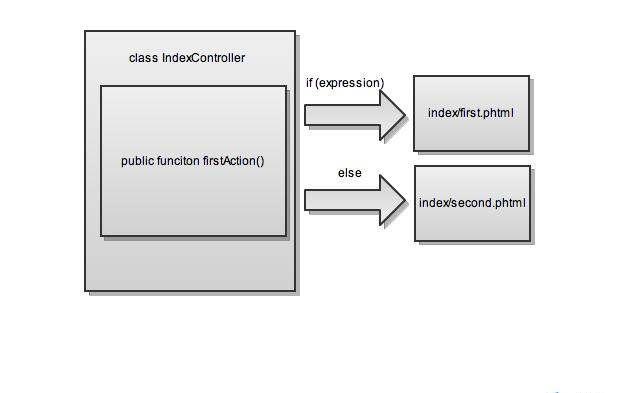
zend framework one action multiple=

The only thing to do is to add some code to your action:

<?php
 
class IndexController extends Zend_Controller_Action
{	
	public function firstAction()
	{
		// place all the logic you need here
		// and every view placeholder assignment
		$this->view->title = "My Title";
 
		// if the logic requires a different markup
		// simply redirect to another view
		if (some_expression) {
			echo $this->view->render('index/second.phtml');
			$this->_helper->viewRenderer->setNoRender(true);
		}	
	}
}
 
// in the application/views/scripts/index
// 1. first.phtml
<h1><?php echo $this->title ?></h1>
 
// 2. second.phtml
<h2><?php echo $this->title ?></h2>

Note that you’ve to setNoRender on the view renderer once you render the other script!

Redirect with Zend Framework

Once I wrote about redirecting with Zend Framework, but what I missed back than was a common mistake. Although the code from my post is working, to be completely correct after redirecting I’d to add an exit() statement.

This is important because the header is changed and if something goes after the redirect there will be some problems. Finally the correct snippet is:

public function() {
	$this->_redirect('some_url');
	exit();	
}

JSON and Zend Framework? – Zend_Json

That’s really a good Zend Framework’s class that help you do the encode/decode job very easily. First of all it escapes everything for you and second it prints a correct/valid code. Note that sometimes if you have a trailing whitespace after the closing PHP tag – ?> that will result in an error.

Here’s some code:

public function jsonAction()
{
	$data = array(3,4,'test', 'my-name' => 3,4);
 
	echo Zend_Json::encode($data);
 
	$this->_helper->viewRenderer->setNoRender(true);
	$this->view->layout()->disableLayout();
}

and the result is:

{"0":3,"1":4,"2":"test","my-name":3,"3":4}

Note that all integers are printed without double quotes – which saves some space!

Download Files with Zend Framework

Download a File

The title may sound unclear enough, but the task is simple. You’ve to make a file download process within a Zend Framework’s controller. Let’s assume we’ve the DownloadController setup:

<?php
 
class DownloadController extends Zend_Controller_Action
{
	public function indexAction()
	{}	
}

In PHP there are at least three simple lines of code that will do the job of downloading a file.

header('Content-Type: image/jpeg');
header('Content-Disposition: attachment; filename="logo.jpg"');
readfile('images/logo.jpg');

Note that here there is a content-type header, which is important cause the browsers understands what kind of file is supposed to be downloaded. The second line suggests a name of the downloaded file and the third one returns the file to the client.

Download a File … within Zend Framework

Those three lines wont work alone in a ZF application, because there’s no view, but even if you create a .phtml (view) file for this action it won’t work, because the header of the returned file is modified.

The question is how to possibly return the file for download, perhaps write some statistics to the database and if there’s a problem (some permission issues for instance) return a message to the user.

The Basic Solution

The solution is simple. First make it work by disabling the view and possibly the layout for this action:

public function indexAction()
{
	header('Content-Type: image/jpeg');
	header('Content-Disposition: attachment; filename="logo.jpg"');
	readfile('images/logo.jpg');
 
	// disable the view ... and perhaps the layout
	$this->view->layout()->disableLayout();
        $this->_helper->viewRenderer->setNoRender(true);
}

Than add some code where you can check the permissions. Just because there’s no view for this action you can redirect to another – errorAction():

public function indexAction()
{
    if (userHasNoPermissions) {
        $this->view->msg = 'This file cannot be downloaded!';
        $this->_forward('error', 'download');
    }
 
    header('Content-Type: image/jpeg');
    header('Content-Disposition: attachment; filename="logo.jpg"');
    readfile('images/logo.jpg');
 
    // disable layout and view
    $this->view->layout()->disableLayout();
    $this->_helper->viewRenderer->setNoRender(true);
}

But that still will prompt you a file to download, so there should be a return statement that will return false:

public function indexAction()
{
    if (userHasNoPermissions) {
        $this->view->msg = 'This file cannot be downloaded!';
        $this->_forward('error', 'download');
        return FALSE;
    }
 
    header('Content-Type: image/jpeg');
    header('Content-Disposition: attachment; filename="logo.jpg"');
    readfile('images/logo.jpg');
 
    // disable layout and view
    $this->view->layout()->disableLayout();
    $this->_helper->viewRenderer->setNoRender(true);
}

So here’s the complete source of DownloadController.php:

<?php
 
class DownloadController extends Zend_Controller_Action
{
	public function indexAction()
	{
	    if (userHasNoPermissions) {
	        $this->view->msg = 'This file cannot be downloaded!';
	        $this->_forward('error', 'download');
	        return FALSE;
	    }
 
	    header('Content-Type: image/jpeg');
	    header('Content-Disposition: attachment; filename="logo.jpg"');
	    readfile('images/logo.jpg');
 
	    // disable layout and view
	    $this->view->layout()->disableLayout();
	    $this->_helper->viewRenderer->setNoRender(true);
	}	
 
	public function errorAction()
	{}
}

and the error.phtml:

<?php echo $this->msg ?>

Check YouTube Video Existence with Zend_Gdata_YouTube

The Video Has Been Removed?!

Have you ever seen the famous message on YouTube: “This video has been removed by the user.”, but what if you’re trying to grab that video via the Zend_Gdata_YouTube?

That can happen when you’re reading the feed for a channel or a user’s list of videos. In the feed everything’s OK – once the video is uploaded it appears into the feed. After that the user removes the video and visiting the link from the feed you’ll get the message above.

Actually what happens when you try to read this “video entry” within a Zend Framework’s application. There must be some way to catch this message?

Trying to Catch

The answer is pretty simple! Zend_Gdata_YouTube’s throwing an exception and it can be easily cached. Here’s some source code:

$apiKey = 'your_api_key';
$client = new Zend_Http_Client();
$gdata = new Zend_Gdata_YouTube($client, 'my-app', null, $apiKey);
try {
       $gdata->getVideoEntry($video_id);
} catch(Zend_Gdata_App_Exception $e) {
       echo $e->getMessage();
}