Tag Archives: javascript

Modyfing Response Headers with Zend Framework

Response Headers

You’ve probably seen that you can track the server response headers with Firebug – a wonderful extension to Firefox.
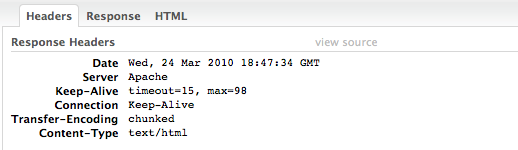
But have you ever asked yourself how to change a response header with Zend Framework.

header()

Typically this is done with the built in PHP function header, where you can setup the header the page must return, but how to make it with Zend Framework?

It’s pretty simple of course, it’s Zend Framework in fact. To be more precise I’ll post a snippet:

$response = $this->getResponse();
$response->setHeader('content-type', 'application/x-javascript; charset=utf-8');
$response->sendResponse();

JavaScript Comparision Snippet

== vs. ===

I know this is really for beginners, but have you ever asked yourself what are the differences between == and === when comparing in JavaScript, and when to use it? Here’s an example:

var a = false;
alert(a === 0); // prints false

That’s false. Even when both the zero and the variable are faulty the entire operation is false. Because the 0 is a number and the variable a is boolean, therefore their different types give us the answer. If there was a comparision only with == the result would be true:

var a = false;
alert(a == 0); // prints true

It’s good when you expect some variable to match certain type to compare with ===. So the correct code is:

var a = false;
alert(a === false); // prints true

Here the type of a compares with boolean. See the complete demo.

jQuery cssText Helps You Improve Browser Reflows

cssText

You know you can manage to redraw an element with single browser reflow. Instead of using .style.property … you can simply add all CSS properties you’d like to change with simply appending to style.cssText property.

var csstxt = $('#selector').css('cssText') + ';top:100;left:100;border:1px solid red;color:#f00;';
$('#selector').css('cssText', csstxt);

That code is a replacement for

$('#selector').css({
   left : '100px',
   top : '100px',
   border : '1px solid red',
   color : '#f00'
});

enjoy!

JavaScript Snippets: IF Statements Optimization

A “Typical Installation” …

As most of the desktop software gives us opportunity to choose from typical or custom installations, let me write what’s a typical IF conditional statement in JavaScript and … every other programing language.

if ( thisIsTrue ) {
    printMe("some message");
}

A “Custom Installation” …

The first thing you can improve from the code above is removing the brackets.

if ( thisIsTrue )
    printMe("someMessage");

Because in JavaScript everything’s on the client – every symbol matters. What if we remove as much as we can!

thisIsTrue && printMe("someMessage");

Javascript Libraries Popularity

JavaScript and Market Share?!

It’s kind of strange to speak about JavaScript libraries and market share, so lets called it “popularity”. Have you ever been interested on which is the most famous JS library.

I’d guess everybody has the answer in his head, right? jQuery is becoming for the JS community something like Google for the web or IE6 on the browser’s market in the beginning of the century. How odd?!

However here’s a short list of who’s first.

1. Robert Nyman’s poll:

Note: original poll page’s here.

Clear enough jQuery rocks. As I personally use jQuery I still think that its success is based on his easy to start nature. However lets see another result chart.

2. Chris Coyier from http://css-tricks.com is showing almost the same result:

Note: original poll can be found here.

3. Finally Polldaddy’s hosting a poll, where the results are even more interesting.

Polldaddy

Note: original source of the poll.

From these results I get more surprised not so much from the jQuery big advantage, but more from YUI. It’s a really very very powerful JavaScript library, perhaps misunderstood maybe because of it’s native complexity, don’t know?!